
PSA: Set your survivor and beneficiary on your registered accounts
Published: 2026-08-14
If you have a TFSA or an RRSP, or you are considering opening one, this public service announcement is for you! I will focus on my experience with Wealthsimple, but even if your registered account sits somewhere else, this is still a call to action to review your account information on file with your financial institution.
Last year I moved my investment accounts from TD to Wealthsimple and, so far, the experience has been really positive. Except for one, kinda big (in my mind) thing.
Wealthsimple does not prompt you to set your registered investment accounts successor holder and/or beneficiary.
Registered accounts come in many flavours. You might recognize their acronyms: RRSP, TFSA, FHSA, RESP, and LiRA. (See my glossary for definitions).
In my experience, I opened registered investment accounts with Wealthsimple wihout having to specify a successor or a beneficiary. I only went looking at my accounts after a youtube video sparked my curiosity to check these settings and I found nothing had been defined. When I created my accounts, designating these important roles was not top of my mind, so it wasn’t done!
Why You Should Care
We’re all going to die someday. Most of us will leave behind loves ones who must deal with all the stuff we’ve accumulated over our lifetime, including our bank and investment accounts.
Just like writing a will, ensuring your registered accounts have up to date information defining who gets them when you die is a small gift you are giving to someone you love. It means there is less hassle and red tape transferring your money to the person you want to gift it to when you die.
Taking 10 now minutes now to jump online and check these settings will save a lot of time and hassle for your executor once you are gone.
If you want a deeper dive, these articles do a nice job outlining what happens should you die without having your registered account’s paperwork in order:
- https://will-kit.ca/tfsa-beneficiary-rules-canada/
- https://www.claret.ca/publications/naming-tfsa-successor-holder/
- https://lawyerinfo.ca/guides/ontario/wills-estate-ontario/probate-trust-ontario/dealing-with-a-deceaseds-tfsa-and-rrsp-in-ontario-probate/
It’s Not All About You (Or Maybe It Is)
Getting your paperwork is in order is the right thing to do and you should do it for your loved ones.
But you matter too! You also want to ensure your significant other(s) have their paperwork in order. Odds are, you will be the one left to pick up the pieces when they are gone. Do yourself a big favour and ask your partner(s) to confirm that you have been designated as the successor or beneficiary on their registered accounts.
Which Accounts Need What?
Different accounts need different people defined in specific roles. This article does a nice deep dive into registered accounts, plus other really important stuff like life insurance policies and pensions.
Here’s a quick chart to help you wrap your head around what you need to set for each type of registered account:
| Account Type | Role You Want to Define | What the Role Means |
|---|---|---|
| RRSP | Beneficiary | Receives the proceeds of your RRSP upon your death. This avoids probate. |
| RRIF | Successor Annuitant or Beneficiary | A successor annuitant continues receiving payments; a beneficiary receives a lump sum. |
| TFSA | Successor Holder or Beneficiary | A successor holder takes over the account without affecting TFSA room; a beneficiary receives a lump sum. |
| RESP | Successor Subscriber | Not a beneficiary, the appointed person to manage the RESP on behalf of the child. |
| FHSA | Successor Holder or Beneficiary | It depends. Check out “Types of Beneficiaries” and “Survivors” on this canada.ca page to understand the different cases. |
Yes, you must check every one of your registered accounts separately across all financial institutions.
Pro Tip: Create a spreadsheet listing all of your registered accounts across all institutions. Check or update each account and list who you’ve defined in specific roles. Referring back to this list in future will be much easier than going back to each account. Remember to review this spreadsheet as needed. For example, if you break up with your partner, or they pass away, you will want to update your account paperwork again.
Update your Wealthsimple Registered Accounts
For Wealthsimple clients, here is their guide on configuring your accounts. It explains the criteria of who can be named as survivors and/or beneficiaries (a very important distinction that you should understand before you begin): https://help.wealthsimple.com/hc/en-ca/articles/360058456753-Add-a-beneficiary-or-successor-to-your-registered-account
I found that the instructions for adding a beneficiary a bit lacking. Note that you must be on the web portal via a browser. At the time of this writing, the option doesn’t exist in the mobile app (I’m using the Android app).
- Login via a web portal and click into the specific registered account
- Click on the gear icon, and choose “Manage Beneficiaries” from the pop up menu
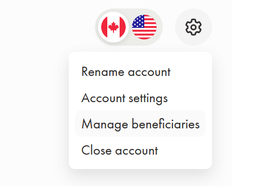
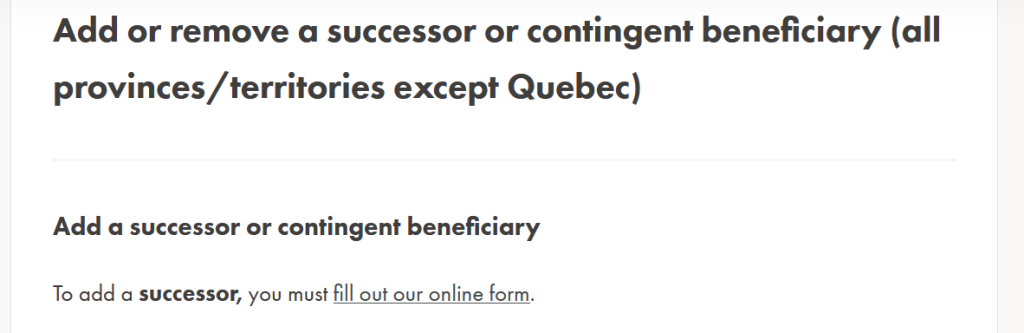
While you can manage beneficiaries online in your account info, you must follow different instructions to add a successor. Note that you need to use a specific online form.
Key Take Aways
- Call to Action: Ensure you and, if you have one, your significant other, have defined survivor-ship and beneficiaries so that whenever the inevitable happens (death comes for us all), accessing your major investment funds does not become a burden of red tape and delays during the worst of times.
- Everyone with a registered account, no matter which financial institution the accounts reside in, should ensure beneficiaries (or equivalent) are up to date
- You must check every account separately. Do your future self a favour and make a spreadsheet with each registered account and who you’ve designated. You can review it as needed, for example if you break up with your partner